


Weather & Widget - Weawow
4.957.94K Reviews
App Specs
- Version
- 7.1.9
- Updated On
- License
- Free
- Downloads
- 10,000,000+
- Developer
- Weawow
- Categories
- Weather
- Platform
- Android, iOS
Screenshots


 Analysis by AppCompare
I judge a weather app by what happens when I need an answer quickly: can I check the sky before leaving, make sense of the forecast, and avoid digging through clutter? Weather & Widget - Weawow makes a strong first impression because its visual presentation gives the information room to breathe. It is a weather app from Weawow, and its combination of a forecast, home-screen widgets, and a photo-led feel makes it more personal than the plain number-and-symbol layout I often see in this category.
That visual approach has a practical side. On a busy morning, I might want to know whether to take a jacket without opening several screens; later, I may want more detail before planning a walk or an outdoor errand. Weawow is designed to serve both quick checks and closer inspection. I would especially recommend it to people who like shaping their phone’s home screen and want weather information to feel clear rather than crowded.
When the forecast depends on a connection
Weather information is only useful when it reflects current conditions, so network access is part of the experience whenever the app needs fresh information. I treat a forecast as a helpful guide, not a promise: conditions can change, and a screen that was useful earlier may not be enough for a decision later. Before setting off on a long trip or committing to an outdoor plan, I check again rather than relying on a glance from hours before.
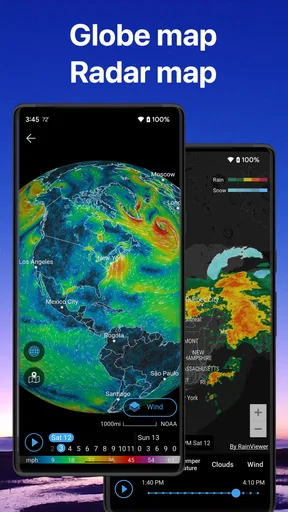
That habit matters most when timing is tight. If rain could change the route I take to work, I look at the forecast before leaving and again if the weather outside starts to disagree with it. The radar view can make nearby patterns easier to understand, but it is best used as context for a decision, not as a guarantee of exactly what will happen at my doorstep.
First Impressions and Features
When I first launched Weather & Widget - Weawow, the clean and visually appealing design caught my eye immediately. The app doesn’t just throw data at you; it presents it in a way that feels engaging and easy to digest. The interface is intuitive, making navigation a breeze even if you're not a tech-savvy user.
One of the standout features is the real-time weather updates. The app provides incredibly accurate weather reports, thanks to its integration with multiple reliable data sources. Whether it’s rain, shine, or snow, you can count on Weawow to keep you informed. It's like having a personal meteorologist in your pocket.
Customizable Widgets
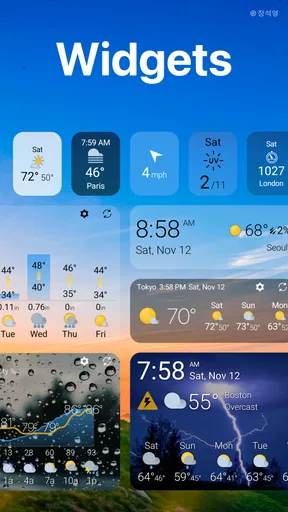
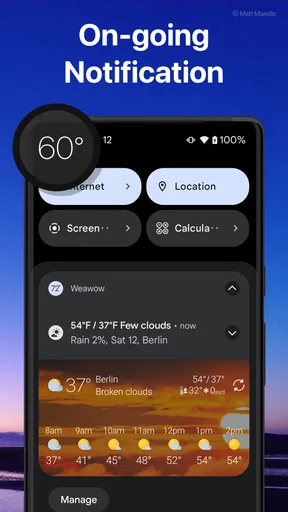
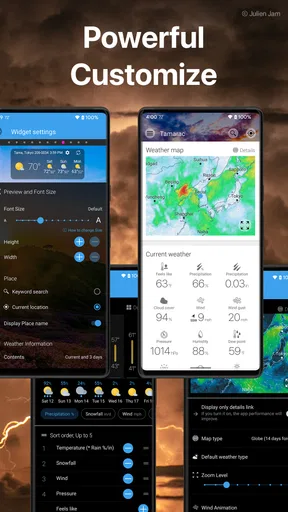
For those of us who love having information at a glance, the widget feature is a game-changer. You can customize widgets to your heart's content, choosing from various sizes and styles to fit your home screen perfectly. Whether you prefer a minimalist look or something more detailed, Weawow has you covered.
Worth Reading Before You Choose

Baby Panda World Brings Quick Play to Modern Phones, but Its Game Library Feels Busy

ESPN’s Live Game View Makes Following Close Games Easier

QuizzLand Review: A Good Fit for Short Trivia Breaks, Not Every Player

Basketball Stars: Multiplayer Is Fast, but Can It Recover When Matches Go Wrong?

WEBTOON Turns Phone Updates Into a Better Reading Routine

Link to Windows Runs on Shared Habits, Not Social Feeds
Not only do these widgets look great, but they also update frequently, ensuring you always have the latest weather info right on your home screen. It’s a small touch, but it makes a significant difference in keeping you connected to the world outside.
Widgets as a quick-check routine
I find a widget most useful when I give it one clear job. A compact version can answer “What should I wear?” while the full app is better for a more careful look at the day. Putting weather beside the other information I check in the morning reduces the temptation to open and close several apps just to make a simple decision. The trade-off is that any glanceable display has limited space: if I need context, I still open the forecast rather than treating the widget as the whole story.
For someone who often changes plans, the widget can also act as a reminder to reassess. I might check it before leaving home, then open the app again before an outdoor appointment. That is a more sensible routine than assuming a home-screen reading will stay current indefinitely, especially when connectivity or changing conditions make a fresh check worthwhile.
Detailed Forecasts
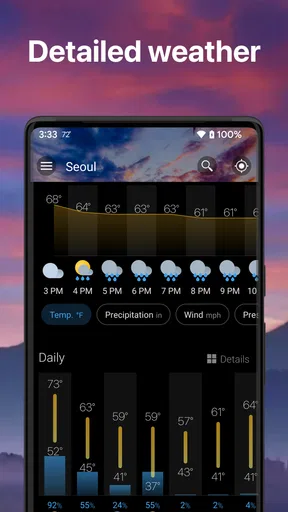
I was pleasantly surprised by the depth of information Weawow offers in its forecasts. It goes beyond just telling you the temperature or chance of rain. The app provides hourly forecasts, detailed wind conditions, humidity levels, and even UV index. This level of detail is perfect for planning your day, whether you’re heading out for a hike or just commuting to work.
Another nifty feature is the weather radar, which lets you visualize weather patterns in your area. It's both educational and practical, especially if you like to stay ahead of impending storms.
Making the extra detail useful
More forecast information helps only when I know what question I am trying to answer. For a routine commute, I start with the hourly view and focus on the period when I will actually be outside. For a longer walk, wind and UV information can change what I bring or how long I stay out. This is a better use of the detail than scanning every available value by habit.
Radar is most helpful when I use it to compare the broad pattern with what I can see outside. If the sky is already dark, a visual view of weather movement can add context, but I would not base a safety-critical decision on an app alone. For severe or rapidly changing conditions, I would also pay attention to local alerts and official guidance rather than asking one forecast screen to do everything.
User-Generated Content
One of the most unique aspects of Weawow is its user-generated content. Users can upload their own weather-related photos, which are then displayed alongside weather forecasts. This adds a personal touch to the app, making it feel like a community of weather enthusiasts sharing their experiences. It's a refreshing break from the usual sterile weather apps.
A more visual way to read the day
The photos give the forecast a human scale: weather stops being only a set of symbols and becomes something people are experiencing in real places. I enjoy that change of mood, but I treat the imagery as atmosphere rather than evidence about conditions at my location. A photo can be appealing and still not answer whether my own street is wet, so I keep the forecast itself in charge of practical choices.
This is one reason Weawow may suit someone who finds conventional weather screens dull. If all you want is the fastest possible temperature reading, the photo element may feel like extra visual material rather than a benefit. If you enjoy browsing and appreciate a more lived-in presentation, it makes routine checks feel less mechanical.
Handling a slow or interrupted connection
On a commute, in a basement, or while moving through an area with patchy reception, I avoid assuming that a displayed forecast has just refreshed. The useful question is not simply whether the app opens, but whether the information is current enough for the decision I am making. If a forecast seems stale or does not match the conditions outside, I wait until I have a better connection and check again instead of repeatedly refreshing and trusting the first result.
For planning ahead, I make the important check before I enter a stretch where service may be unreliable. That is a general precaution rather than a claim that the app works offline. It also helps separate a connection problem from changing weather: I can compare what I saw earlier with the sky and decide whether I need a newer forecast before continuing.
Ad-Free Experience
Now, here's something that really sets Weawow apart from its competitors: it's completely ad-free. In a world where ads seem to invade every corner of our digital lives, using an app that respects your space is a breath of fresh air. You get to enjoy all the features without any annoying interruptions.
The no-ad approach is a meaningful advantage for a tool I may open several times in a day. It keeps the forecast from competing with promotional blocks for attention, which matters when I am checking quickly outside or between tasks. Weawow is free to use, and optional in-app purchases range from around two to fifty dollars per item. I would think of those purchases as a personal choice, not a requirement for deciding whether the basic style and workflow suit me.
Privacy and data-conscious habits
The app’s store summary says no data is collected, which will appeal to people who pay attention to privacy when choosing everyday utilities. I still make a habit of reviewing an app’s current privacy information and my device settings before settling into a routine, because that is sensible for any app I use regularly. If you prefer the simplest possible setup, keep your use focused on the places and forecast details you actually need rather than turning every check into a browsing session.
Weawow is rated for Everyone, and its broad appeal makes sense: checking weather is useful for families, commuters, and people planning time outside. It has more depth than a bare forecast glance, though, so someone who wants only a number and an icon may prefer a simpler built-in weather tool. The choice comes down to whether the customizable presentation and extra context are worth having on your screen.
How it compares with simpler weather apps
Many standard weather apps aim to get you to a temperature or rain estimate with as few steps as possible. Weawow can do that through a widget, but its appeal goes beyond speed: customization, detailed forecast views, radar, and community photos give me more ways to engage with the weather. Compared with a minimal app, it can feel richer and more inviting; compared with a service focused only on emergency alerts, it is better understood as an everyday planning companion, not a substitute for official warnings.
That difference helps clarify who should skip it. If you dislike adjusting layouts, never use widgets, and want the fewest possible screens, a default weather app may be a better fit. If you enjoy tailoring what appears on your home screen and sometimes need wind, UV, or radar context, Weawow offers a more flexible routine. I would not choose it solely for a claim of perfect accuracy; no forecast can remove uncertainty, so checking conditions and using good judgment still matter.
Final Thoughts
After spending some quality time with Weather & Widget - Weawow, I can confidently say that it’s one of the best weather apps out there. Its combination of detailed forecasts, customizable widgets, and user-friendly design makes it a must-have for anyone who wants to stay updated with the weather. Plus, the ad-free experience is just the cherry on top.
So, if you’re on the hunt for a reliable weather app that’s also a joy to use, give Weawow a try. It might just become your new favorite app for checking the forecast.
Its standing among users is another reason it is easy to consider: Weawow has a 4.9 average from around 727,000 ratings, with more than five million installs. It first appeared on May 1, 2017, and version 7.1.1 lists Android 5.0 as the minimum operating system requirement. Those details make it a well-established option, though the best test is still whether its screens and forecast style work for your own habits.
My everyday example is a changeable workday: I check the widget while getting ready, use the hourly forecast to decide whether to carry a layer, and take another look before an outdoor errand if the sky has shifted. If I am planning a hike, I spend longer with wind, UV, and radar rather than relying on the first screen. That simple routine uses the app’s depth without turning every forecast check into a project.
My verdict is that Weawow is a particularly good fit for people who want a polished, customizable weather companion and do not mind opening the full forecast when a quick glance is not enough. Its connectivity-dependent nature means I plan important checks when I have a dependable signal and do not assume a displayed view is fresh after a long gap. If that balance suits you, this free app is worth trying; if you want nothing beyond a bare temperature readout, a simpler alternative will probably feel more direct.
Pros
- User-friendly interface with beautiful design.
- Highly accurate weather forecasts.
- Customizable widgets for your home screen.
- Ad-free experience enhances usability.
- Supports multiple languages.
Cons
- Widget customization can be overwhelming.
- Limited options for severe weather alerts.
- Requires internet for updates.
- Battery consumption could be improved.
- No integration with smart home devices.
FAQs for Weather & Widget - Weawow
What features does Weather & Widget - Weawow offer?
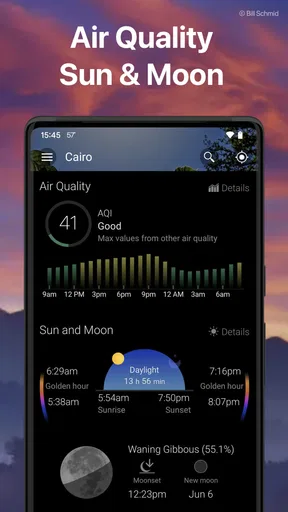
Weather & Widget - Weawow provides detailed weather forecasts, including temperature, humidity, wind speed, and precipitation. It features beautiful weather-related photos submitted by users, customizable widgets, and real-time updates. The app supports numerous languages and offers radar maps, sunrise and sunset times, and a UV index, making it a comprehensive weather tool.
Is Weather & Widget - Weawow free to use?
Yes, Weather & Widget - Weawow is free to download and use. It does not contain ads, ensuring a seamless user experience. Some additional features or premium content might be available through in-app purchases, but the core functionalities are accessible without any cost.
How accurate is the weather forecast on Weawow?
The app uses data from multiple reputable weather sources, aiming to provide accurate and up-to-date forecasts. Users have noted its precision in predicting local weather conditions. However, as with any weather forecasting service, there can be occasional discrepancies due to rapidly changing weather patterns.
Can I customize the weather widgets on Weawow?
Absolutely! Weather & Widget - Weawow offers a range of customizable widget options. Users can change the appearance, size, and the level of detail displayed. Whether you prefer a minimalistic view or a detailed forecast, the app allows you to tailor the widget to your liking.
Does Weawow require a constant internet connection?
While Weawow can display cached data offline, an internet connection is required for real-time updates and accurate weather forecasts. The app periodically syncs with weather services to provide the most current information, so a stable connection is recommended for the best experience.


